From Manual Processes to Smart...
22 Oct 2026


Automating Financial Reporting through PowerApps would increase Operational Productivity- From Manual to Automated Reporting. Financial reporting is life to decision-making, yet many businesses struggle to manage it properly within the organizations due to manual processes, errors, and compliance risks. PowerApps, this is where Microsoft comes in with its low-to-code solutions, and this blog will show you how your business will take advantage of PowerApps to transform financial reporting. This blog also tells you how to avoid common pitfalls and gain an edge.
For any decision maker that requires flexibility, PowerApps has a solution tailored for turning old processes into contemporary ones. This blog narrates the extent to which automating financial reporting with PowerApps can save your time, improve accuracy, ensure compliance, and enable the workforce to concentrate resources on the organization’s strategic goals.
Many organizations face persistent issues in their financial reporting processes, including:
Finishing the work involves a lot of time consuming using the process of collection and bringing data from spreadsheets, ERPs, and legacy systems by various teams.
Time-consuming processes financial data usually spread across multiple systems, that is to say, ERP, CRM, payroll, etc. Therefore, it becomes impossible to gather accurate reports in real-time.
Laws governing financial operations usually demand that such sectors as IFRS have an accurate and transparent system of reporting. Inconsistent handling of data has the potential of being freed up to audits or even financial penalties.
The basic problem is that when businesses grow in size, legacy systems collapse under the weight of increasing data volume.
Finance is very important for organizations to perform their efficiencies in managing financial data. In fact, it is developed with great features entertaining the finance team, making financial reports easier, more accurate, complying, and more effective in decision making.
Power Apps collect data from myriad sources like ERPs, Excel, and cloud services and put them into action dashboards that have various KPI indicators, charts, and financial trend projections. Thus, it allows for instant insights into profitability, expenses, and cash flows.
Inefficient manual processes for invoice approvals, reporting on expenses, and reconciliations could slow processes. Power Apps automated this workflow process where employees submit receipts through mobile applications. This approval at the touch of a button also triggers updating the ledger automatically.
Among the benefits that Power Apps confer on compliance are built-in encryption, audit trails, and role-based access control to support the integrity of data under financial regulations like the International Financial Reporting Standards (IFRS) and Generally Accepted Accounting Principles (GAAP).
AI-powered insights provide revenue forecasts by finance teams and risk assessments and simulate scenarios that help the organization plan strategically and make informed decisions.
Custom applications could be made without much programming knowledge by finance professionals. Prebuilt templates from Power Apps will be there for budgeting, expense tracking, and financial statement management that ensure very fast implementation.
Power Apps avoid unauthorized access to financial data by governance with role-based access controls, which restrict access to financial data based on user roles.
Live notifications keep the team informed about any budget overruns, overdue invoices, or pending compliance deadlines for proactive management of the finances.
Through the power apps finance teams can view dashboards in any device making remote financial monitoring and faster decisions possible.
Dynamic integration with Microsoft 365, including Excel, SharePoint, Power BI, Dynamics 365, SQL Server, and third-party accounting software makes the entire financial data centralized.
Using these features, Power Apps allows finance teams to report their finances well, secure them, and highly optimize the financial operations very efficiently.
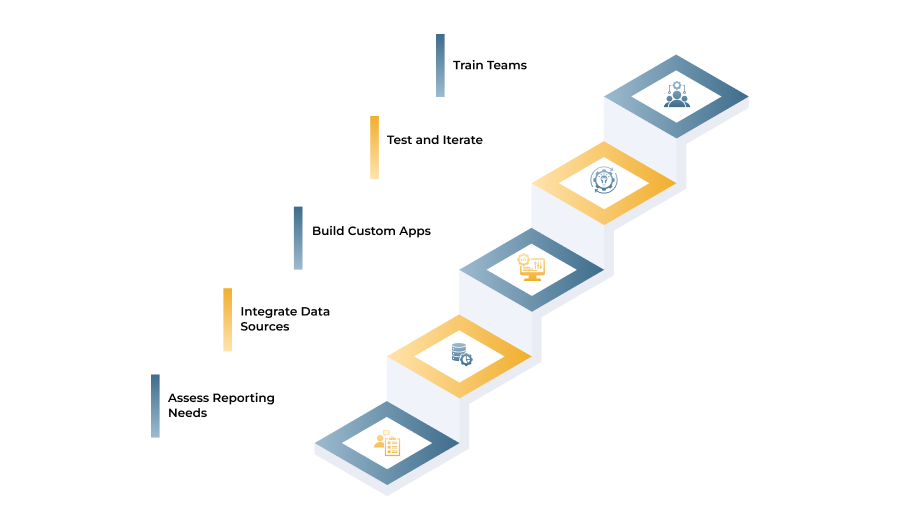
Follow this roadmap to automate financial reporting with PowerApps:
Use templates like Budget Tracker or Expense Manager to automate tasks:
By leveraging PowerApps for financial reporting automation, businesses can reduce manual efforts, minimize errors, and gain real-time insights into financial performance. This transformation not only improves operational efficiency but also enhances compliance and decision-making.
We specialize in custom PowerApps development to help businesses automate their financial processes effortlessly. Contact us today to discover how we can optimize your financial reporting with cutting-edge automation solutions.

08 Oct 2026

24 Sep 2026
14 Sep 2026