From Manual Processes to Smart...
22 Oct 2026


Businesses need to leverage the power of data and technology to stay competitive. Organizations across the United States are increasingly relying on powerful tools like Power BI and PowerApps to streamline operations, gain valuable insights, and enhance decision-making processes. Integrating these tools can help businesses not only manage data efficiently but also create dynamic applications tailored to their needs. If you’re looking to take your business to the next level, Power BI dashboards paired with PowerApps integration is a game-changing solution that can supercharge your business insights. In this blog, we will explore the power of these tools, their benefits, real-world use cases, and provide a step-by-step guide on how to integrate them successfully.
Microsoft, developer of the powerhouse business analytics tool Power BI, brings businesses great insights to drive informed judgment and further visualize its data and track key indicators. Power BI is the solution to create interactive, real-time dashboards that present the direct pulse on performance to show a company’s scorecard. Whether it be on sales performance, customer behavior, or operational efficiency, Power BI ensures that all the data that is essential for decision-making is placed within reach to be accessed from just about anywhere.
PowerApps is a low-code platform that allows its users to generate custom applications without the need for deep coding skills. This tool aids businesses in building applications that solve specific operational problems, automate workflows, and enhance collaboration. With PowerApps, the team can create deep integration between applications and their data, which allows for the team to access, edit, and interact with information in real time.
These two integrated platforms deliver a dynamic solution that covers data visualization, custom application development, and the basis for actions-taking from these insights. Because the augmented state of Power BI + PowerApps in handling productivity issues accentuates operational efficiency, knowledge base enrichment, and funneling workflows.
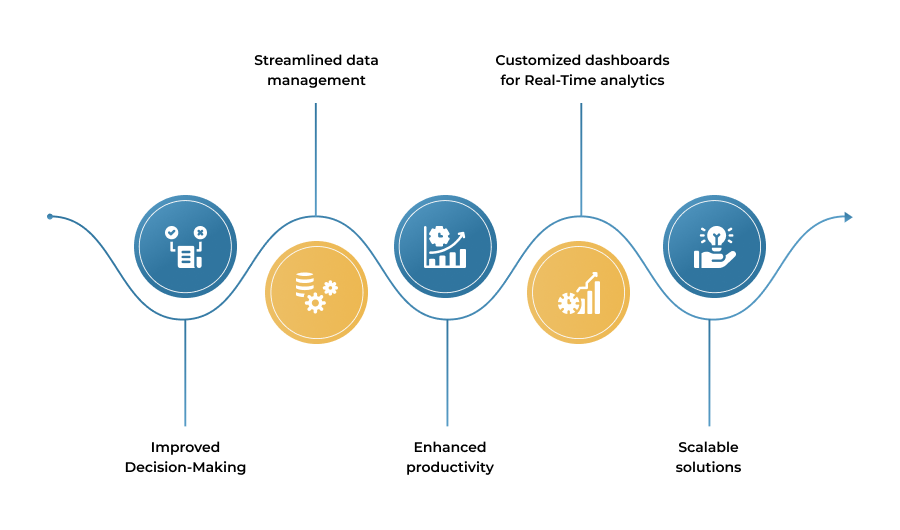
The integration of Power Bi dashboards with Power Apps has numerous benefits for businesses. Here are some key advantages of this resounding integration.
When Power Bi’s real-time visual effect is combined with the interactive force of Power Apps, it facilitates faster decisions aimed at solving crucial issues based on current and actionable insight. Decision-makers can have access to data through Power BI, though amendments can be made in Power-Apps directly, without the need for switching from one platform to another.
If Power BI and PowerApps are integrated with each other, greater coherence in data management exists. PowerApps builds-useful apps that can receive, process, or streamline data from multiple sources, while Power BI provides a solid layer of analytics that produces valuable insight on raw data.
PowerApps empower your employees to create workflows and apps that require custom solutions to the data-while Power BI makes such apps more valuable by providing them with important data. This integrative configuration in turn helps employees to gain instant access to solutions and to automate tasks and drive out manual efforts. Expect greater productivity on account of a committed workforce spending less time on comparatively important matters.
The Power Bi dashboards inside PowerApps can be freely visualized and tracked under any departmental or organizational roles. Unique dashboards provide deep KPI insights into real-time operation performances and a starting point for operational adjustments.
Power BI and PowerApps integration allows businesses to scale their operations without the need for complex, costly custom software solutions. You can easily create solutions that grow with your business, ensuring you stay ahead of the competition.
The Power BI and PowerApps Integration was usefully used across various industry settings, allowing corporations to use data and customized applications for optimizing operational processes, to ensure information-driven decisions and improve overall efficiency. Below are real-world scenarios of Healthcare, Insurance, FinTech, OEM (Original Equipment Manufacturing), and Logistics industries that implemented this integration.
Power BI and PowerApps Integration has proven beneficial for healthcare, by well-empowered patients and patient care. Power BI in real-time keeps track of the patient condition and resource usage while PowerApps streamline the scheduling, staffing, and equipment tracking through hospitals and clinics to enhance decision-making and resource allocation.
Power BI and PowerApps Integration bears its fruits for insurance companies in claims processing, customer insight, and operational excellence; as Power BI displays claims insight, fraud detection, risk analysis, while PowerApps are enabling agents to work more efficiently and bear a competitive advantage in the insurance domain on claim approval, client management, providing better turn-around times and better customer service.
In FinTech, the Power BI and PowerApps integration is the solution to keeping tabs on the financial entity and rendering personalized services. Power BI displays financial performance indicators and associated user behavior so that PowerApps filter through loan applications, clearance processes, and real-time customer interactions in improving decision-making and affording higher customer satisfaction.
OEMs leverage Power BI and PowerApps to optimize production efficiency, supply chain management, and inventory control. Power BI provides insights into production performance, while PowerApps streamlines work order management and equipment tracking, improving operational efficiency and reducing production delays.
In logistics, Power BI and PowerApps integration improves fleet management, route optimization, and delivery tracking. Power BI visualizes fleet performance and delivery metrics, while PowerApps enables real-time data input from drivers, optimizing routes and ensuring timely deliveries, leading to cost savings and enhanced customer satisfaction.
Humana: A prominent health provider, harnessed the power of Power BI to transform its data-driven operations. With over 1,000 users accessing real-time analytics, the organization improved decision-making and operational efficiency. The integration enabled actionable insights into patient care, resource allocation, and financial performance, fostering a data-driven culture. By leveraging Power BI’s advanced visualization and reporting capabilities, Humana enhanced member experiences, streamlined processes, and set a benchmark for innovation in the healthcare industry.
Centrica: A global energy services company, leveraged Power BI to enhance its data visibility and operational efficiency. By integrating Power BI across its organization, Centrica empowered over 6,000 users with real-time insights into performance metrics and energy operations. This transformation streamlined decision-making, reduced costs, and improved customer satisfaction. The solution enabled Centrica to foster a data-driven culture, ensuring agility and innovation in the competitive energy sector.

Let’s assume a help for having Power BI dashboards in PowerApps with the help of the following elementary step-by-step guide.
Set up Power BI by obtaining an account, connecting it to your data sources of choice, and creating dashboards and reports presenting powerful insights focusing on your business needs. Keep in mind adding KPIs and metrics pertinent to your business on said dashboards. Filters and visualizations should be tweaked to match existing organizational goals.
Develop an app with PowerApps according to the needs of your business process. It is imperative to link up the app to all necessary data sources, presenting real-time data. Easy-to-use, scalable, this app is meant to be extensible for the future, e.g., for seamless business operations.
Link Power BI dashboard to your application, thanks to PowerApps and Power BI integration capabilities. Beautify your application appearance, luxurious data visualizations to please user-proceedings with better decision-making. Well lay-out is consistent in branding while enhancing the usability for accessing crucial data insights.
Conduct end-to-end testing to validate seamless data flow between Power BI and PowerApps, making sure that the real-time updates of the dashboards and data from PowerApps trigger Pure Power BI. Ensure integration is monitored to last.
Integrate Power BI and Power Apps optimization practices to make the most from your project:
The biggest of all principles, where data is the main source, so it must be correct and clean. This will help you to offer accurate and valuable insights.
Customize any dashboard your team decides to work upon-different teams have different aspects of visualization values they deem necessary.
Take advantage of Power BI Templates and Automation processes which accelerates revenue growth while reducing risks from errors.
When tasks become repetitive, it makes sense to automate them and thus grow your productivity while giving you time.
For more advanced users, consider the following best practices:
Use Power BI’s AI-powered features like forecasting and anomaly detection to gain even deeper insights.
Automate workflows between Power BI and PowerApps using Power Automate to improve efficiency.
Regularly monitor the performance of your applications and dashboards to ensure optimal performance.
The future of Power BI and PowerApps integration looks promising, with continuous improvements being made to both platforms. Expect deeper AI integration, enhanced data visualization options, and more seamless connections with other Microsoft tools like Dynamics 365 and SharePoint. Additionally, businesses in the United States and globally will continue to embrace low-code solutions, making these tools even more accessible to a wider audience.
Power BI dashboards and PowerApps integration empower businesses to make data-driven decisions, streamline operations, and create tailored solutions that address unique challenges. As companies in the United States embrace digital transformation, adopting these tools provides a significant competitive edge. By following best practices and leveraging their combined power, businesses can unlock their full potential and accelerate growth. Contact us today to explore more about how we can help integrate Power BI and PowerApps into your operations!

13 Apr 2026

06 Apr 2026

09 Mar 2026