Predicting and managing patient flow for hospital with Power BI

HealthcareWeb development
Aug 11, 2025
6 Min Read
Predicting and managing patient flow for hospital with Power BI

In the ever-changing terrain of healthcare administration, efficient patient flow is the prerequisite for operational excellence and improved patient outcomes. A hospital is always challenged by the vagaries of managing patient journeys-from admission to discharge. This gets more and more challenging with irregular patient inflow, resource limitations, and the obligation to offer the best-of-care.

Why Patient Flow Matters More Than Ever?

The Ripple Effect of Inefficient Patient Flow

1. Patient Safety and Outcomes

Delayed care worsens patients’ conditions, leading to adverse health or readmission. A smooth flow assures access in time for intervention.

2. Operational Efficiency and Cost Reduction

An optimized patient flow prevents bottlenecks, it curtails the time of stay and bed utilization, amounting to high cost savings and more capacity.

3. Staff Morale and Retention

Under chaotic conditions, stress and burnout for healthcare professionals increase. A good system will support its staff, hence, it will be morale and retention.

4. Patient Experience and Reputation

Patient experience has become important in shaping the reputation and market position of a hospital. Efficient flow is the backbone of positive experiences. Both online and word-of-mouth reviews influence patients choosing a particular hospital.

5. Financial Performance

An inefficient patient flow can cause postponement of lost revenues due to constrained capacities or penalties for failure to meet required performance metrics imposed by various regulatory authorities.
Limitations of Current Hospital Management Systems

Limitations of Current Hospital Management Systems
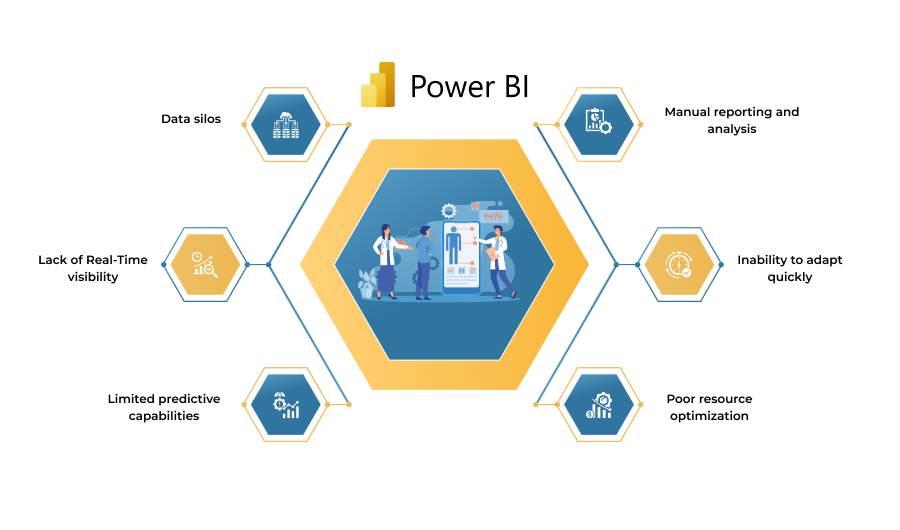
Common Challenges with Traditional Systems:

  • Data Silos: Information is commonly trapped within departmental systems, preventing a one-front view of patient flow.
  • Lack of Real-Time Visibility: Interim reporting and batch processing mean the view often is outdated by the time it is available, which discourages proactive decision-making.
  • Limited Predictive Capabilities: The rest of the conventional systems are without a more sophisticated algorithm that could be used to timely forecast patient demand and resource needs.
  • Manual Reporting and Analysis: Using spreadsheets and compiling data manually consumes time, invites errors, and it is not scalable.
  • Inability to Adapt Quickly: Sudden changes in patient volumes or operational requirements cannot be quickly adjusted due to rigid system structures.
  • Poor Resource Optimization: Without a clear, real-time picture of resource availability and patient demand, hospitals struggle to optimize bed allocation, staff scheduling, and equipment utilization.

Power BI’s Predictive Analytics Stack

Microsoft Power BI integrates with Azure Machine Learning and AI services to deliver a robust predictive analytics framework tailored for healthcare:

1. Data Integration and Model Training

Power BI ingests data into one data model from varieties of sources, such as EHR systems, admission-discharge-transfer logs, staffing rosters, and external sources, like local flu-trend data.

2. AI-Driven Forecasting

Prebuilt AI templates and AutoML allow even nontechnical users to train time-series and regression models that predict patient admission, ED arrivals, and lengths of stays with high accuracy.

3.  DAX (Data Analysis Expressions)

Its powerful language allows the formulation of custom calculations and complicated queries further analyzing the patient flow environment.

4. What-If Analysis

With Power BI, scenario planning can allow hospital administrators to simulate the impacts of their decisions on patient flow, such as increases in bed capacity or changes in staffing levels.

Real-Time Dashboards for Decision Makers

Real-time dashboards in Power BI transform predictive outputs into actionable visualizations for various stakeholder groups:

Executive Overview
  • Key Metrics: Daily forecast vs. actual admissions, bed occupancy rates, average wait times.
  • Alerts: Automated flags for predicted capacity breaches or staffing shortages.
Operational Command Center
  • Patient Flow Map: Interactive floor-plan showing bed availability, patient status, and transfer queues.
  • Resource Heatmap: Color-coded view of staff allocation, equipment utilization, and room turnover times.
Departmental Insights
  • ED Triage Dashboard: Hourly arrival forecasts, staff-to-patient ratios, and triage category distributions.
  • Discharge Planning Board: Predicted discharge dates with actionable follow-up tasks.

Building Dynamic Resource Allocation Models

Power BI enables hospitals to simulate “what-if” scenarios and optimize resource deployment in real time:
How Power BI Facilitates Dynamic Resource Allocation:
  • Integrated Data View: This is integration of data from staffing systems, bed management systems, equipment tracking, and patient flow predictions, to provide a holistic view.
  • Scenario Planning and Simulation: Modeling alternative resource-based strategies for patient flow and operational metrics and witnessing their outcomes before the implementation.
  • Capacity Planning: Realizing the current and future capacity needs for beds, operating rooms, and specialized units does so with respect to so-called patient volumes.
  • Staffing Optimization: Nurse-to-patient ratios, shift scheduling, cross-training-all decisions are made based on data to make sure adequate staffing levels exist in all departments.
  • Equipment Management: Optimizes deployment and maintenance of medical equipment, ensuring availability at times most needed at any location.
  • Bottleneck Identification: Identifies the potential choke points along the patient journey so that they can be mitigated by redirecting resources.
  • Performance Monitoring: Tracks the implemented resource allocation strategies therapeutically and informs the evaluation for continuous improvement and refinement of the considered models.

Strategic Impact on Hospital Leadership

Strategic Impact on Hospital Leadership
How Power BI Transforms Strategic Decision-Making:

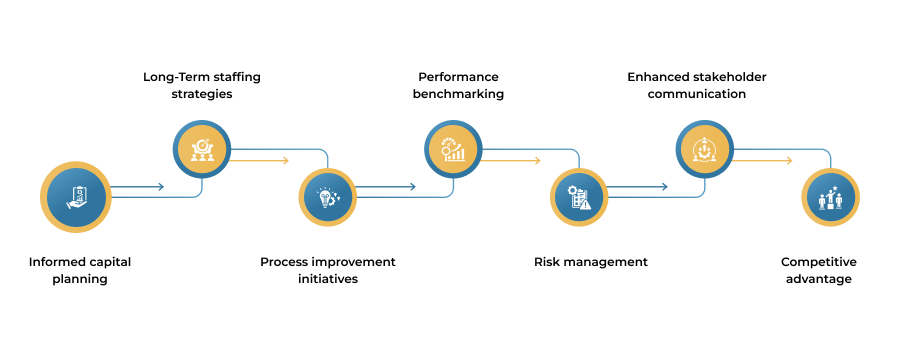
1. Informed Capital Planning

Governments of infrastructure and technology projects can be supported on data science-based projections of patient volume and need for resources.

2. Long-Term Staffing Strategies

Have strong workforce plans aligning with the expected patient demand while maintaining an appropriate level of staffing and skill mix.

3. Process Improvement Initiatives

Look at systemic inefficiencies and bottlenecks with our interventions, which include process improvement through bottleneck reduction and streamlining.

4. Performance Benchmarking

Patient flow indicators based on the industry and best practice are compared to see improvement in some areas and set the standard for others.

5. Risk Management

Proactively identifying and mitigating challenges relating to patient overcrowding, resource shortages, and potential quality of care issues.

6. Enhanced Stakeholder Communication

Providing pertinent data and transparent insights to board members, investors, and regulatory bodies establish trust and accountability.

7. Competitive Advantage

Hospitals that can master patient flow through advanced analytics have high competitiveness, earning more patients and increasing their visibility in the market.

Conclusion

Managing patient flow is no longer a backend concern, it’s a core operational strategy that directly impacts hospital efficiency, patient outcomes, and profitability. Power BI empowers hospital leadership with predictive insights and real-time visibility, enabling proactive decisions that optimize every stage of the patient journey. From reducing wait times to maximizing resource utilization, Power BI transforms raw healthcare data into strategic intelligence. Contact us today to improve your hospital’s performance with data-driven solutions?
FAQs

What are the main benefits of implementing Power BI for patient flow management?

What data sources can Power BI integrate with for patient flow analytics?

What types of dashboards and reports are most effective for hospital leadership?

What key performance indicators (KPIs) should be tracked in patient flow dashboards?

What are the data privacy and security considerations for healthcare Power BI implementations?

Related Posts